A small port-forwarding utility
- Rust 96.9%
- Python 3.1%
| .github/workflows | ||
| .vscode | ||
| doc | ||
| fuzz | ||
| resources/json | ||
| src | ||
| .gitignore | ||
| build.rs | ||
| Cargo.lock | ||
| Cargo.toml | ||
| config.toml | ||
| LICENSE | ||
| README.md | ||
| release.py | ||
| rustfmt.toml | ||
| test.py | ||

fwd
A port-forwarding utility.
Here's how it works:
- Get the latest release of
fwd - You install
fwdon the server somewhere in your$PATH(like/usr/bin/, or.local/bin) - You install
fwdon the client (like your laptop) - You run
fwdon the client to connect to the server, like so:
doty@my.laptop$ fwd some.server
fwd will connect to some.server via ssh, and then show you a screen listing all of the ports that the server is listening on locally.
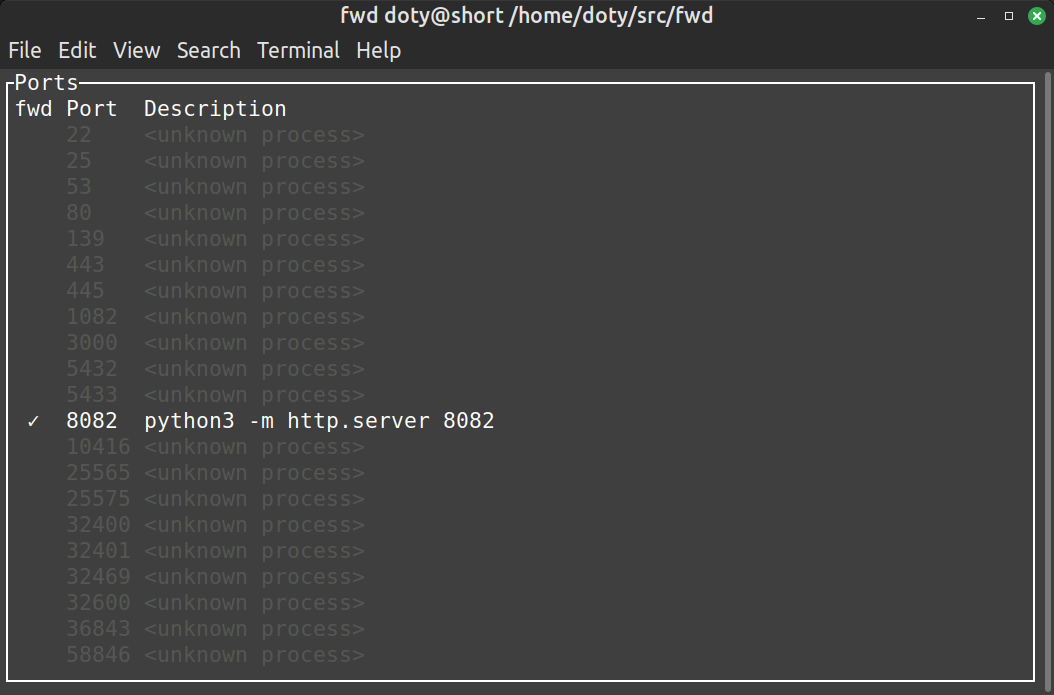
Use the up and down arrow keys (or j/k) to select the port you're interested in and press e to toggle forwarding of that port.
Now, connections to that port locally will be forwarded to the remote server.
If the port is something that might be interesting to a web browser, you can press <ENTER> with the port selected to open a browser pointed at that port.
If something is going wrong, pressing l will toggle logs that might explain it.
Press q to quit.